www.toxik.sk | CG Blog
autodesk maya, vfx, tips and tricks, rendering, compositing, 3D, 2D
- new LiveSearch / InteractiveSearch in scenes and projects (like Ajax Live Search)
- access to multiple projects directories on different locations
- automatic SetProject
- support scenes with sub-directories
- Set project context menu + Browse project context menu
- caching of big directories
- auto caching mode, if cache is on
- Copy pyranha.pyc to your scripts directory:
- Copy pyranha.bmp to your icons directory:
- If Use Cache is enabled, when new file is created in any directory where wasn’t scenes before, cache is not updated.
- Maya 2015, 2016, 2017, 2018, 2019 support
- fixed borderStyle warning message
- Maya 2015, 2016 support
- Maya 2014 support
- Maya 2013 support
- max custom directories limit increased to 5
- corrections on paths module
- tweaks of GUI
- Maya 8.5 not supported (disabled)
- fixed menuItem error
- fixed missing icons (pyranha.bmp, pyranha.xpm)
- fixed error if Maya.env variable MAYA_PROJECTS_DIR is None (Maya 8.5 only)
- new debug mode (for developing only)
- new LiveSearch/InteractiveSearch
- disabled InteractiveSearch, because Maya crashing
- fixed Warning for -la/-labelAlign
- fixed Warning for -aft/activeFrameThickness
- new exclude incrementalSave directories
- fixed sorting of directories
- fixed Add Pyranha to Shelf
- new Set project context menu
- new Browse project context menu
- some GUI tweaks
- official release
- new multiple projects directories
- new InteractiveSearch in projects
- cache
- new InteractiveSearch in scenes
- completly rewrited code from mel-script to Python (30% speed-up)
- sort by date
- instant autoclose
- new include scenes sub-directories
- new autoclose check box
- rewrited GUI
- first release
Pyranha for Maya (Scene Browser)
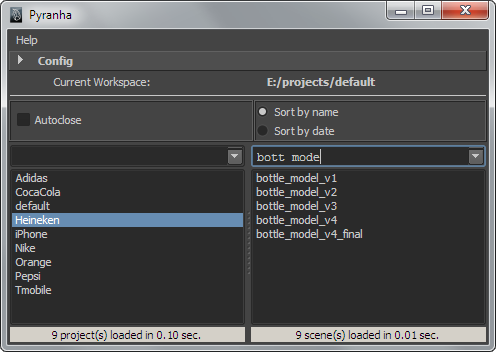
 Pyranha for Maya is developed for fast access to Maya projects and scenes with live searching feature. Script is available for Maya 2008+, + means latest version of Maya. :) You can check Pyranha in action in this youtube or vimeo tutorial. If you have some problems or you want to suggest some features, send me email, you can find my email in About section.Pyranha is free and if you like it, you can donate 5 $/€ or more, all is welcome, if you want see Pyranha live. :) There is DONATE button under download link in this article. Cheers. ;)
Main features:
Screenshots:
Installation:
Example: C:\Documents and Settings\[username]\My Documents\maya\2008\scripts
Example: C:\Documents and Settings\[username]\My Documents\maya\2008\prefs\icons
Execute in ScriptEditor:
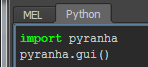
Now you can use Pyranha “Help menu” to use Add Pyranha to Self.
Facebook page: https://www.facebook.com/pages/Pyranha-for-Maya/382217895167271
Download here:

Known issues:
Release Notes:
1.1.8
1.1.7
1.1.6
1.1.5
1.1.4
1.1.3
1.1.2
1.1.1
1.0
0.97
0.95
0.8
0.7
0.5
0.1


26 Responses to “Pyranha for Maya (Scene Browser)”
Leave a Comment
Categories
- Commercials (13)
- Fusion (7)
- Games (4)
- Maya (56)
- Mel-Scripts (6)
- Plug-ins (10)
- Python (3)
- News (60)
- Nuke (3)
- RenderMan (6)
- V-Ray (3)


Archive
- March 2014
- May 2013
- March 2013
- February 2013
- January 2013
- December 2012
- September 2012
- August 2012
- June 2012
- May 2012
- April 2012
- March 2012
- March 2011
- October 2010
- September 2010
- August 2010
- July 2010
- June 2010
- May 2010
- April 2010
- March 2010
- February 2010
- August 2009
- May 2009
- April 2009
- January 2009
- December 2008
- October 2008
- September 2008
- August 2008
- May 2008
- March 2008
- January 2008
- June 2007
- May 2007
- April 2007
- February 2007
- December 2006
- March 2006
- November 2005
- March 2004
- April 2003
- March 2000
March 26th, 2012 at 10:35 am
Hey,
your script is really good and very useful.
Thank you very much.
It would be nice if there is the possibility to add 2 more custom directories or set a custom amount of directories
Thanks again,
cheers,
Günther
March 26th, 2012 at 11:48 pm
Thanks Günther, i will try in next release.
March 30th, 2012 at 11:42 am
hello,
i like your script, but the right part, where the maya files would be shown is empty…
are there any soultions?
March 30th, 2012 at 11:53 am
Can you send me screenshot with opened config on my email ? You can find email in About section on this page. I mean that you not entered correct directories.
April 1st, 2012 at 2:01 am
Great script, but it seems to have problems with paths that have a “_” at the beginning. I sometimes use them to bring a path to the beginning of a list.
April 1st, 2012 at 2:12 am
“_” at beginning of project name or ?
April 1st, 2012 at 11:40 am
Exactly
W:\_Projectname
April 1st, 2012 at 12:23 pm
Ok and what you mean problems ?
April 1st, 2012 at 12:27 pm
Can I send you a screenshot?
April 1st, 2012 at 12:28 pm
Yes, do it please. :)
May 6th, 2012 at 11:21 am
Hi Toxik.
I have a problem with folders that have space among words. For example, I have a folder name “Animation Client” in the drive E. So I type E:\Animation Client but there is nothing show up in the right window.
May 6th, 2012 at 11:26 am
Hi, i mean it’s because your folder “Animation Client” is not directory with projects. What is content of your “Animation Client” folder?
May 6th, 2012 at 11:42 am
Hi Toxik.
Please ignore my earlier comment. I finally found out how it really works. There is nothing wrong with the space among words. Great script.
June 8th, 2012 at 8:44 am
Hi! Man, your tool is very cool.
- Please add the feature: Close window on “Esc”. As in basic maya window.
June 8th, 2012 at 9:12 am
Hi Leksey,
i mean it’s not possible, because there are two search fields with focus and searching is main priority, but i will check it.
June 8th, 2012 at 9:36 am
If you make replaying command for close the window? One click open window, double click close window.
June 30th, 2012 at 12:05 am
Pyranha have new Facebook page, there will be new info about news, features and updates. And better feedback for us.
http://www.facebook.com/pages/Pyranha-for-Maya/382217895167271
February 12th, 2014 at 12:44 pm
Hi! Feedback:
If you use quick search, but not save last position selection scene file. Please add this feature.
February 12th, 2014 at 12:49 pm
Update:
_______________________________________________
If you use quick search, then, selection is not saved the last selected file.
February 12th, 2014 at 1:31 pm
Hi Leksey, i know about this bug, but i don’t have time to do it now, but it’s on my TO DO list. Thanks for your interest.
March 11th, 2014 at 2:31 pm
Did anyone here try the StockCG project manager ?
March 11th, 2014 at 2:49 pm
No, because it’s online asset library, it’s not project manager. :)
September 19th, 2014 at 8:59 pm
Hey Toxic!I know the Script is pretty usefull, because a friend of mine is using it.But i have a problem, that Maya(2014/Student Version)can’t find the Scene in the path. Is there any solution?
Thanks
Dennis
September 19th, 2014 at 9:13 pm
Hi, Dennis, can you send me some screenshots of your problem on my email in about section ?
March 30th, 2019 at 6:51 pm
import pyranha
pyranha.gui()
dOES nothing in Maya 2018.3
¿How to start it?
August 10th, 2019 at 11:36 pm
bhbilbao check youtube video in article.